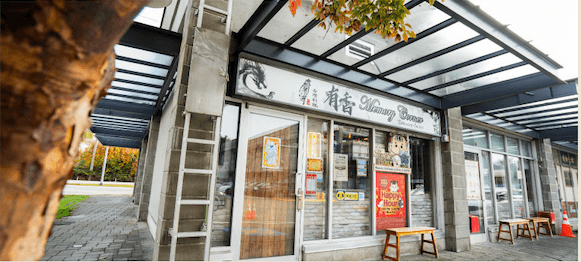
Menus don't have room for stories
QR codes entered the restaurant world during COVID as an emergency "no-contact ordering" tool. But industry tracking shows QR code usage has kept growing year over year since 2020, with North American smartphone QR scan users reaching a new high in 2025[1], and in restaurants specifically, QR-based menus have moved from a stopgap to a permanent fixture[2] — yet most restaurants still treat them as nothing more than "digital menus."
That's a waste. Every restaurant operator knows this awkward fact: every word on a menu is expensive. One extra line of text pushes out a photo; one extra paragraph of story costs you a dish slot. For us — cooking Taiwanese food carried from a 1975 Kaohsiung lamb hot pot shop — this hurts, because every dish has a story worth telling, and the menu only has room for names, prices, and one small photo.
We tried the usual workarounds: bigger menus, a separate brand booklet on each table, even a hardcover "stories of our dishes" book at the entrance. The problem is the same — when guests sit down, they pick up their phone, not a brochure.
So we flipped the angle: don't make guests flip through stories, let them scan stories — upgrade the QR code already on every table from "digital menu" to "story doorway."
Today's table QR: ordering. What we want it to become: stories.
To be clear about what we currently do — today's QR codes on Memory Corner's tables work the same as most restaurants': scan and you land on the order page. It's a habit we kept from COVID. Useful, functional, but stuck at the utility layer.
After living with it for a while, we started seeing the same interface could do more. The 90 seconds a guest spends waiting for food is currently spent scrolling Instagram — it could be spent reading that dish's Taiwan story. So here's what we're planning to extend the same table-side QR into:
-
Dish story pages (planned): Scanning the card beside our Angelica Root Lamb Hot Pot would tell you how the recipe started at Grandpa Wu's 1975 Kaohsiung shop and why the broth simmers six hours. Scan Three-Cup Chicken and you'd find the family proportions for the "three cups" (soy sauce, sesame oil, rice wine) — including the bit where our grandma insists Thai basil goes in only at the final flash-fry.
-
Cross-location routing: The Coquitlam soft-opening menu and the Richmond full menu can sit behind the same physical card, with the dashboard switching destinations by location — this is the core advantage of dynamic QR, and it gets very practical once you open a second store.
-
Seasonal menu entry (planned): Lunar New Year, Mid-Autumn mooncakes, summer shaved-ice season — every menu pivot becomes one dashboard change, and the cards on the table stay exactly where they are.
Part of this article shares what we're already doing with QR (ordering, cross-location design); part of it documents the next steps we're planning — and along the way, lays out how to design this for any restaurant operator wanting to try the same.
Why "dynamic" QR codes, not the regular kind
QR codes aren't new in restaurants — almost everyone tried digital menus during COVID. Most didn't keep them, and the reason is always the same: once you print a QR code, the destination is locked. Change the menu, change the page, change the URL — and you reprint every card.
Dynamic QR codes fix exactly this. The encoded URL is a relay URL; the actual destination is editable in a dashboard, while the printed pattern never changes. For a restaurant, that gives you four concrete benefits:
-
One print run, multiple locations: Our Richmond and Coquitlam stores share the same batch of table cards. The dashboard routes by location/time, so Coquitlam guests see the soft-opening menu while Richmond guests see the full menu — without different physical cards.
-
Seasonal swaps with no reprint: Lunar New Year, Mid-Autumn mooncakes, summer shaved-ice season — every menu pivot is one dashboard change, and the cards on the table stay exactly where they are.
-
Loyalty entry point: A QR on the printed receipt sends guests to the Memory Corner membership page. The receipt template stays the same; the dashboard handles new campaigns.
-
Scan analytics: Which dish's story gets scanned most, which table has the highest scan rate, weekend vs. weekday patterns — the dashboard surfaces all of it.
How to pick a dynamic QR tool: 5 options compared
Before getting to "which one we picked," it's worth scanning the market. Dynamic QR tools differ on four things that matter: pricing model (subscription vs. one-time purchase), scan limits, redirect speed, and built-in safety detection. For restaurants, the first two drive long-term cost; the last two drive guest experience.
| Tool |
Pricing model |
Dynamic edit |
Scan limit |
Redirect speed |
Safety check |
| OwnQR |
One-time USD $15 |
✅ Editable for life |
Unlimited |
<100ms (edge redirect) |
✅ Google Safe Browsing[3] |
| QR Tiger |
Monthly subscription |
Paid plans |
Tiered by plan |
Standard |
Partial |
| Uniqode (formerly Beaconstac) |
Monthly + enterprise |
✅ |
Tiered by plan |
Standard |
✅ |
| Bitly QR |
Subscription (Bitly plans) |
✅ |
Tiered by plan |
Standard |
Partial |
| QR Code Generator |
Freemium + paid |
Paid plans |
Limited on free |
Standard |
Partial |
For restaurants, the single biggest differentiator is the pricing model. Table cards live on for years; a subscription means "the moment you stop paying, every printed card on every table goes dead." That's an unacceptable long-term risk for a small operator. A one-time purchase eliminates it — which is the main reason we ended up with OwnQR (and the conclusion this comparison points to on its own).
The tool we use: OwnQR (one-time purchase, no monthly fee)
Most dynamic-QR services on the market are subscription-based — $9, $19, $39 per month. If you stop paying, the QR codes either break or get hijacked to a paywall. For a restaurant, the real risk isn't the monthly cost — it's the prospect of every printed card going dead if that company shuts down or changes terms.
So we picked a one-time-purchase tool: OwnQR. USD $15 once, QR codes editable for life, no monthly fee, no scan limits, no "upgrade to unlock" tiers. For small operators this pricing model is much safer than subscriptions — print the cards once and use them forever.
A few details that matter in practice:
-
Redirect speed: Sub-100ms edge redirect — guests don't sit through a "redirecting…" white screen.
-
No app download for guests: Just the native camera app. This matters especially for older guests who don't want to install anything.
-
Scan dashboard: OwnQR's analytics view shows scans per QR and time-of-day patterns — useful because it tells you which dishes guests are most curious about.
-
Artistic QR: Branded designs, not just black-and-white squares — we worked our brand colour into the table-card QR so the table layout feels coherent.
(Disclosure: OwnQR is a tool we work with, and the founder is a regular at our Richmond location. We chose it because the buy-once pricing fits restaurant timelines — not as a paid placement.)
Where to start as a restaurant owner: the minimum viable version
If you run a restaurant and want to try this, we'd recommend starting in four steps — you don't have to do them all at once:
- Pick 3 dishes with the strongest stories — not the bestsellers, the ones guests ask about most often. When we roll this out, we'll start with Angelica Root Lamb Hot Pot, Three-Cup Chicken, and Braised Pork Rice — the three dishes guests most often ask "where did this come from?" about.
- Write a 300–500 word story page per dish, hosted on your own website at /menu/dish-name (or a dedicated stories domain). The key word is your own site — never park stories on a third-party platform, or the traffic isn't yours.
- Bind each page to a dynamic QR code — one QR per dish. With a buy-once tool, this step is paid once and done.
- Print as table cards next to the dish on the menu. Business-card size (90×54mm) works; on the back, put a short prompt like "Scan to read this dish's story."
After the first three dishes work, expanding to more is just repetition — same tool, same dashboard, same workflow.
Pitfalls we avoided (you should too)
-
Don't build an app. Nobody downloads an app to eat dinner. Stay on the "camera → browser" shortest path.
-
Don't gate stories behind email signup. No popups, no forms, no retargeting pixels. The moment guests realize a QR scan is harvesting data, the trust is gone.
-
Don't write stories like marketing copy. Write about the family, the ingredient, why the recipe is the way it is. "Welcome to our signature dish" is the wrong register.
-
Make the cards durable. Restaurant tables see soy sauce, soup, grease. Laminate the cards or use synthetic paper, at least 350gsm; round the corners to prevent curl from scraping. In practice, standard cardstock typically needs reprinting within two weeks; waterproof synthetic paper holds up for a full season or more.
Which restaurant types benefit most?
Not every restaurant needs dynamic QR codes — but these five operator types tend to see results quickly:
🍜 Small independent restaurants
Few dishes, many stories. Each signature dish deserves its own story page — QR is the cheapest way to bring that story to the table.
🚚 Food trucks
No menu wall, limited surface area. One QR sticker holds the full menu, allergen info, and payment link.
🥐 Bakeries and cafés
Daily-rotating items, frequent seasonal specials. Dynamic QR switches today's menu in one click — no reprinting POP cards every morning.
🧋 Bubble tea & drink shops
Delivery-platform links, seasonal launches, loyalty points — three entry points through one QR; the cup sticker stays the same forever.
🎪 Pop-ups & seasonal vendors
Different events, different locations, different menus. The QR image stays fixed; the back end switches destinations — print one batch of cards, use them for a whole year.
Next visit, scan one
Next time you're at Memory Corner, the QR codes on the table will get you to the order page — that interface is what we're slowly extending, with dish-story pages, seasonal-menu entry points, and membership all rolling in over time. If you run a restaurant yourself and want to push the same table-side QR further, OwnQR is the lowest-risk way in — a buy-once tool means even a failed experiment only costs USD $15.
For the full Memory Corner brand story, see the Richmond flagship three-generation guide, or the Coquitlam North Rd soft-opening article.